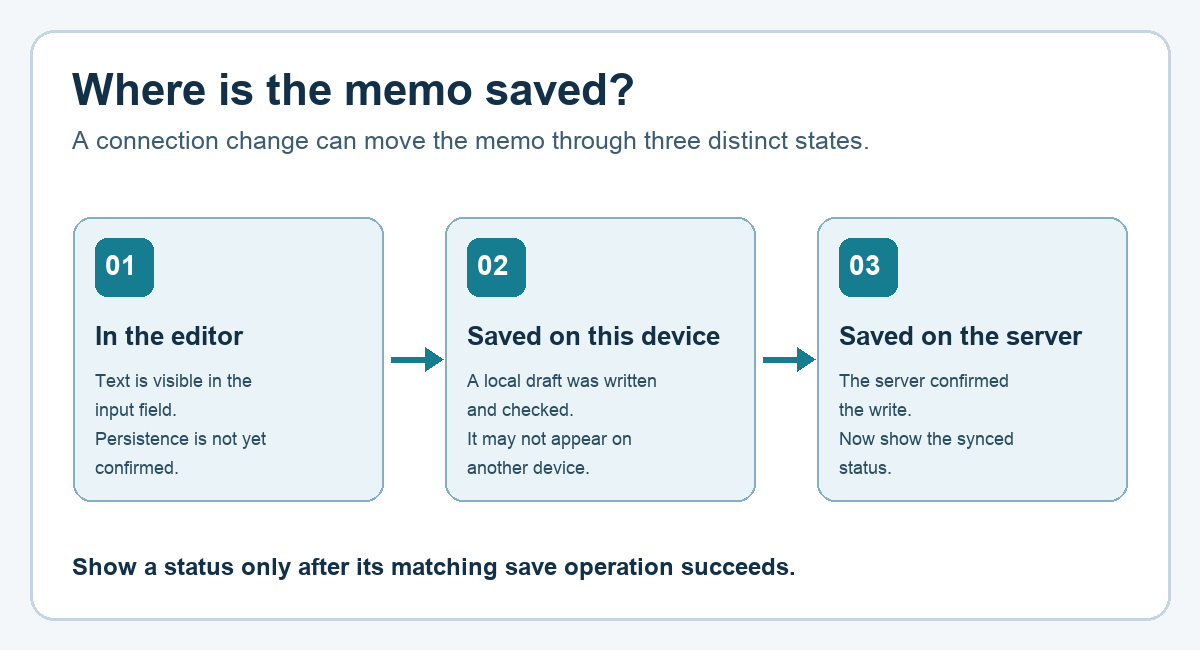
Quick answer: A note visible in an editor, a draft saved on the current device, and a note confirmed by a server are three different states. Show each status only after the matching operation succeeds. When a connection returns, compare the local draft with the server copy before deciding what to sync.
This walkthrough uses a fictional personal notes app. It is a design exercise with expected outcomes, not a claim that an app was built or tested. It is useful when you ask an AI assistant to plan the first version of a notes app or review the messages shown during an interrupted save.
1. Name the three states before designing the screen
| State | What has been confirmed? | Suggested screen message |
|---|---|---|
| Editing | The words are in the input field. | “Editing note” |
| Saved on this device | The local draft write completed and the app checked its result. | “Draft saved on this device” |
| Saved on the server | The server confirmed the note write. | “Synced” |
A message such as “Saved” needs a specific meaning. A visible editor does not prove that the text will survive a refresh. A local draft may survive on one device while remaining unavailable on another. These distinctions determine what the app can honestly tell its user.
The accompanying diagram maps each label to a different confirmation point in the save flow.
2. Walk through one interrupted save
Imagine that someone types “Book the meeting room” while riding a train. The app first shows the text in the editor. It then writes a draft on the device and changes the label to “Draft saved on this device.” The connection disappears before the server responds. The screen keeps the draft visible and says that syncing is pending. It does not show “Synced.”
When the connection returns, the app checks whether the server already has a version of that note. If another device changed the same note in the meantime, the app can present both versions or keep a separate copy for review. The team must choose this rule before it implements automatic replacement. A timestamp alone is not a complete product decision: the app also needs to define which clock and version it trusts.
3. Give the AI assistant a precise design request
Design the save flow for a personal notes app. Separate text visible only in the editor, a draft confirmed on this device, and a note confirmed by the server. Show the user-facing message for each state. After a connection returns, check whether the server has another version before suggesting a sync rule. Ask me whether to keep both versions, let the user choose, or apply a documented automatic rule. Provide expected outcomes for refresh, app restart, and a change made on another device. Treat these as a design proposal, not executed tests.
4. Turn the design into four checks
| Scenario | Expected observation |
|---|---|
| Save a draft, then reopen the same screen | The entered text remains if the local save was confirmed. |
| Write while offline | The app describes the local draft without claiming server confirmation. |
| Reconnect after an interrupted request | The app checks the existing server copy before showing a synced state. |
| Edit the same note on another device | The app follows the chosen version rule and offers a clear review path. |
These rows are proposed checks. Run them in the actual browser, app, and storage environment before calling them passed tests. Also decide how long local drafts remain, what happens when browser data is cleared, and how drafts behave on a shared device or after an account switch.
Try it: Read the save label in an app you use. Write down exactly where the note must be stored for that label to be true. That one sentence is a useful starting point for both the interface copy and the test plan.
Read the Korean edition of this article.
'English Articles' 카테고리의 다른 글
| Turn a Long Notice into Five Informative Cards with AI (0) | 2026.09.23 |
|---|---|
| Organize Research with Chrome Tab Groups: Search, Reading, Sources (0) | 2026.09.23 |
| Design Photo Attachments with Separate Preview and Upload States (0) | 2026.09.23 |
| Practice English with a 10-Minute AI Cafe Role-Play (0) | 2026.09.23 |
| Explain One Rule to Beginners and Practitioners with AI (0) | 2026.09.23 |


댓글